
Markdown Mastery: Crafting Transmit-Ready Docs for Backend Development Projects
Unlock advanced Markdown techniques to create precise, collaborative documentation that streamlines backend development and boosts developer productivity—no fluff, just results.
Markdown Mastery: Crafting Transmit-Ready Docs for Backend Development Projects
In the fast-paced world of backend development, mastering Markdown isn't just a nice-to-have. It's your secret weapon for creating transmit-ready docs that supercharge developer productivity and collaboration.
By the end of this guide, you'll wield advanced Markdown techniques tailored for software engineering projects. These skills let you craft clear, maintainable documentation that integrates seamlessly with version control, automates workflows, and eliminates common pitfalls. The result? Backend development processes shift from chaotic to efficient.
Why Markdown Rules Backend Development Documentation
Backend projects demand precise documentation for API specs, database schemas, and deployment guides. Markdown excels here because its plain-text format ensures clarity without the clutter of proprietary tools. John Gruber created it back in 2004, and it's become the go-to for developers everywhere.
Teams see real gains from well-structured docs. They cut down support tickets and slash onboarding time. Think about API endpoints: a simple Markdown table outlines parameters, responses, and error codes way better than a sprawling spreadsheet. GitHub and GitLab render these previews instantly, boosting collaboration. And unlike Word or LaTeX, Markdown's syntax stays lightweight, making maintenance straightforward. This 'docs-as-code' approach treats documentation with the same rigor as code. It improves accuracy and teamwork. Nail these basics, and you're set for advanced techniques that amp up clarity and collaboration in your backend docs.
What Advanced Markdown Tricks Boost Your Backend Dev Docs?
Advanced Markdown goes beyond basics to handle backend specifics. Task lists track issues with checkboxes: - [ ] Fix auth middleware. Code blocks shine for snippets, with syntax highlighting that covers dozens of programming languages.
Fence your Go or Node.js code like this:
func handler(w http.ResponseWriter, r *http.Request) {
    // Backend logic here
}
Tables document endpoints cleanly:
| Endpoint | Method | Description |
|---|---|---|
| /api/users | GET | Fetch users |
| /api/users/1 | DELETE | Delete user |
Embeds pull in diagrams. Alerts like
Note: Rate limit at 100 req/minadd emphasis. Emojis flag urgency (🚨 Deprecated). These keep docs transmit-ready. They parse perfectly in tools from VS Code to GitHub. Readability stays high without bloat. All this supports backend workflows like schema reviews directly.
Best Practices for Structuring Markdown in Software Engineering Projects
Structure drives usability in large backend projects. Start with hierarchical headings: # Project Overview (H1), ## API Endpoints (H2), down to ###### Edge Cases (H6). This aids navigation and searchability. A clear heading hierarchy enhances readability.
Add frontmatter at the top for metadata:
---
title: Backend API Guide
version: 2.1
authors: [dev1, dev2]
---
Link consistently: [Database Schema](./schemas/users.md). Optimize images with alt text: . For scale, split into modular files: one per service or module, linked via a SUMMARY.md or sidebar. This keeps files under 100 lines, easing reviews.
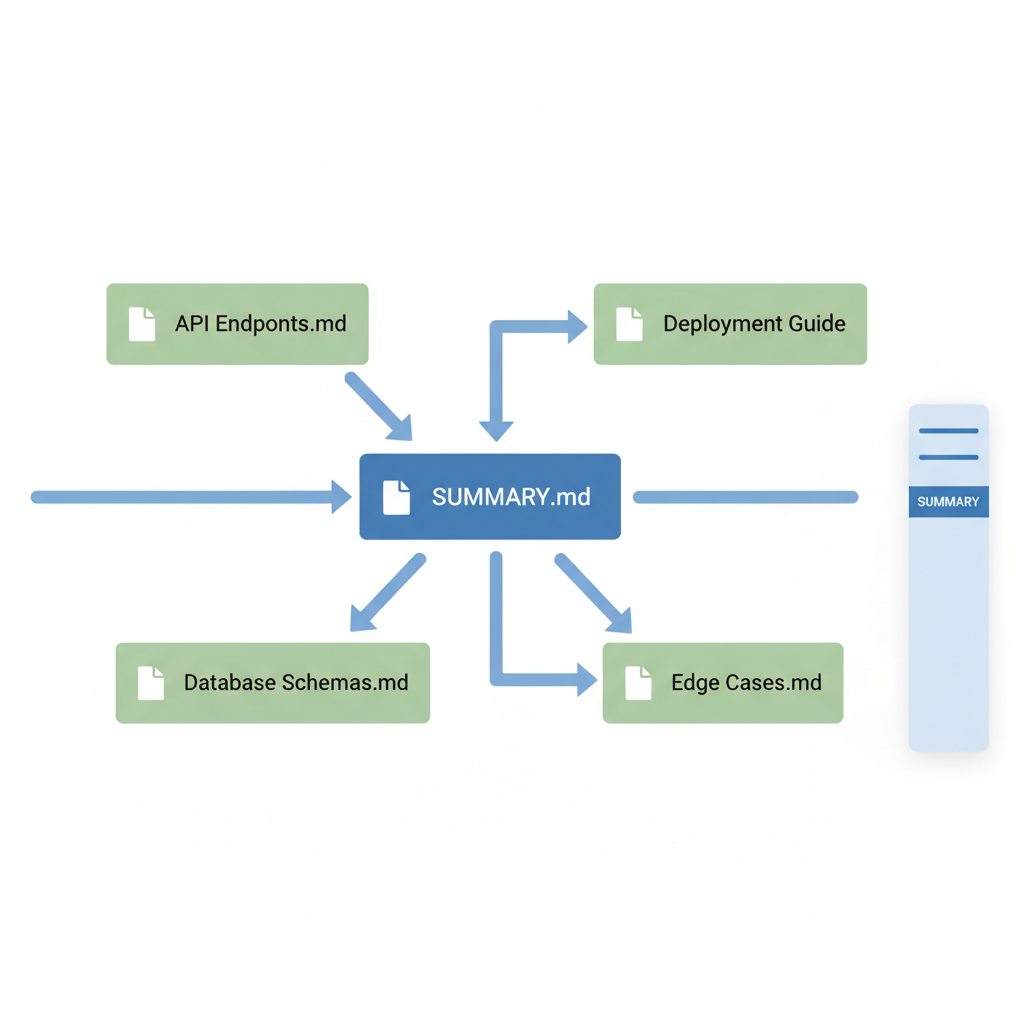
Consistent practices ensure your docs remain maintainable. They weave in the clarity that backend teams crave. Ever tried reviewing a massive single doc file? Nightmare. Modular setups change that.
How Do You Integrate Markdown into Version Control for Killer Collaborative Workflows?
Git turns Markdown into a collaboration powerhouse. Commit docs alongside code in a monorepo for unified versioning. GitHub previews render live, catching issues early. Teams like Temporal.io saw huge jumps in community contributions after adopting GitHub monorepos for docs. They also crushed broken links with PR reviews.
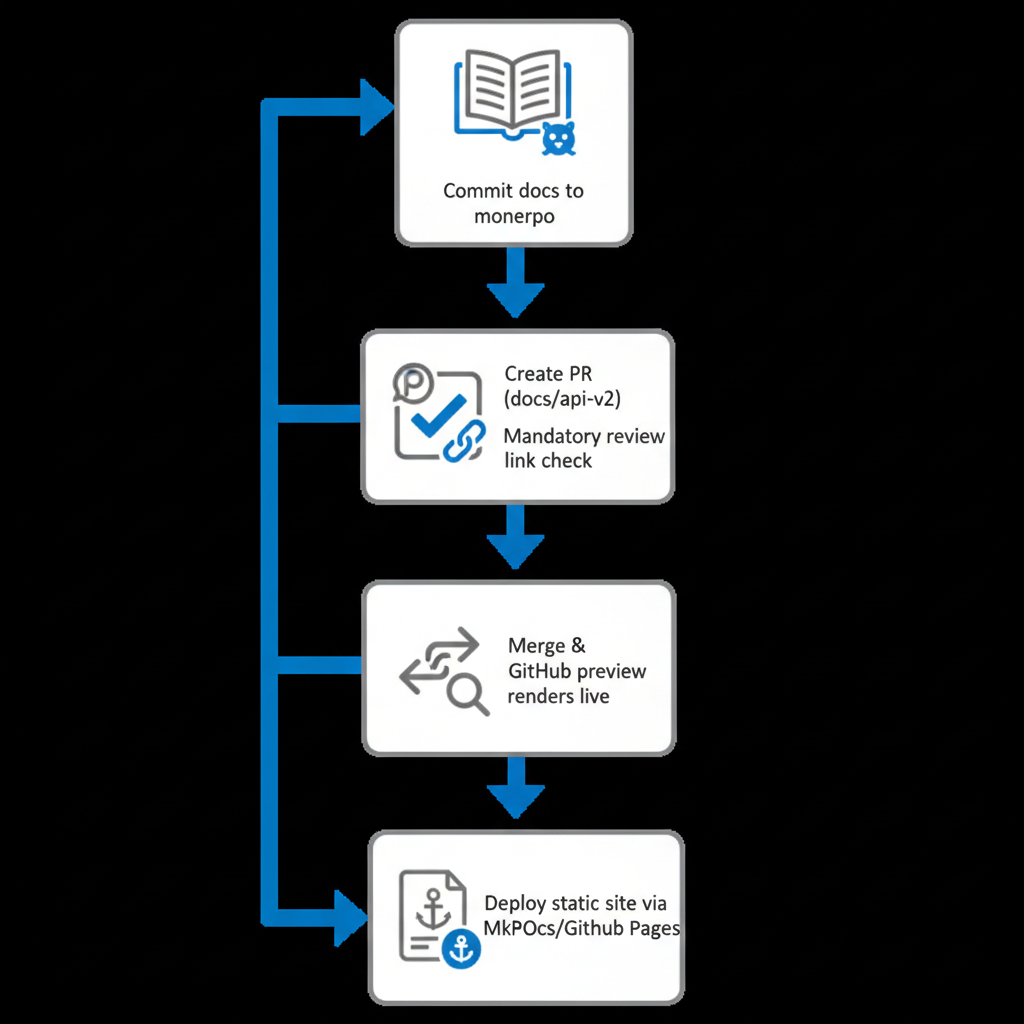
Branch like code: docs/api-v2 for updates. Tools like MkDocs or GitBook build static sites from Markdown, deployable via GitHub Pages. CI/CD validates links and formatting pre-merge. This setup fosters pull requests for doc changes, just like features. Solid docs can make or break how people view your product. Integrate this way, and your backend docs gain the collaborative edge of version control.
Automating Markdown Documentation to Skyrocket Developer Productivity
Automation elevates Markdown from static to dynamic. Scripts generate API docs from OpenAPI specs or code comments using tools like Swagger2Markdown. Prettier linting enforces style: run prettier --write *.md in CI. Pandoc converts Markdown to PDF or HTML for stakeholder shares.
GitHub Actions deploy sites on push:
name: Build Docs
on: [push]
jobs:
  build:
    runs-on: ubuntu-latest
    steps:
      - uses: actions/checkout@v3
      - run: mkdocs build
      - uses: actions/upload-pages-artifact@v1
Linters and CI/CD cut manual errors and ensure consistency. Auto-update changelogs with git log scripts. Picture this: no more chasing broken links or style gripes. These hacks free developers for core work. They amplify productivity in backend pipelines. Want to shave hours off your week? Start automating today.
Common Pitfalls in Markdown for Technical Documentation, and How to Dodge Them
Even pros stumble. Here's how to dodge the main ones:
- Over-nesting lists or tables: Limit to three levels. Test in multiple viewers to avoid broken renders.
- Inconsistent syntax across teams: Standardize with
.prettierrcand linters. - Skipping alt text or semantic headings: Always add descriptive
alttext. Use a logical H1-H6 flow for accessibility. - Version drift: Dedicate a
CHANGELOG.mdwith anchor links.
Test renders on GitLab, Netlify. Preview often and review in PRs. Prepared this way, your docs stay robust. What pitfalls have you hit? Sharing in comments helps everyone.
Master these Markdown techniques, and watch your backend development projects transform: clearer codebases, faster onboarding, and happier teams. Start refactoring your docs today. Your future self (and colleagues) will thank you. Dive into more programming tutorials to keep sharpening your software engineering edge. Who knows what web development tricks you'll pick up next?
Related Articles

How Twitter's AI Translation Is Breaking Language Barriers for Global Software Engineering Teams

Running LLMs Locally: Performance Gains for Backend Development Without Cloud Costs

Building Backend Systems with Java Spring Boot for Embodied AI in Robotics Startups